

Updated: February 17, 2026
I love apps. I tested and helped develop apps at the corporate level. I guess I’ve never stopped testing (and buying!) cool stuff. Now you get to explore my fave tools and tech.
Fave Apps
My Tech Stack
- Website: WordPress
- Courses, membership: WordPress
- Social scheduling: MissingLettr, Metricool* (read review)
- Website Analytics: Rybbit
- Email marketing: GetResponse*
- Scheduling: Calendly
- Audio & video editing, transcription: Descript, Camtasia
- Podcast repurposing: CastMagic*
- Custom Integrations: Zapier, Pabbly Connect*
Email Marketing
Most businesses are fine with MailerLite*. We used it for years. But… once we started a membership, it wasn’t enough to support our needs.
We’ve been on quite a journey with email marketing ever since we left ActiveCampaign. I don’t regret leaving ActiveCampaign because it’s been buggy and expensive (my clients still have issues with it). But…. finding a replacement has proven to be quite difficult.
At the moment we are using GetResponse. I was attracted to it because it offers webinars as part of their plan, and it integrates with other tools. But, the webinar feature is pretty clunky for getting people from a webinar and onto the master list. I think I’ll get the hang of it, but it’s not been easy.
Task Management
We manage tasks using Project.co, which is also how we manage all of our own work as well as client deliverables.
Courses & Community
If you’re a soloprenuer, you can’t go wrong with Podia*, which is also one of the more affordable course platforms on the market.
We tried several platforms: Podia, LearnWorlds, Teachable, MemberVault, HeartBeat … and we migrated our community to WordPress.
Look, Circle, Kajabi, and the platforms we’ve tried absolutely work, but we hit too many limits and the prices keep going up. Or, in the case of LearnWorlds, the platform itself evolved and it became clear we’re not its ideal client (they’re chasing the corporate training market).
We learned we could reduce costs while maximizing flexibility and functionality by using WordPress (stack includes: Elementor, LearnDash, BuddyBoss, SureCart, SureMembers, Gamipress, and OttoKit).
Podcasting
Hosting
I recommend Captivate*. Amazing customer service.
Editing
- Audio editing, filler words removal, transcript: Descript
Mics
- Podcasting + Everyday Mic: Shure SM7B* XLR (requires CloudLifter* and an interface). I use the Rodecaster Pro** (v1, I don’t need the v2 features).
- XLR Cables: I recently upgraded to Mogami Gold… AWESOME
Videos
- My current setup: Canon M50 Mark II*, Sigma 16 mm f/1.4 lens*, Elgato Cam Link 4K*
- Most people need: Logitech C922x* webcam + Logi Tune app (free!) (this is what you see below in the “space-saving desk setup”)
- Streaming: I’ve used Restream* for years
Social Media Scheduling
We’ve used a lot of different social media scheduling tools. If you’re a small business owner interested in analytics (AKA results) and you’re not an influencer, podcaster, or content creator, you absolutely CANNOT go wrong with Metricool*. I love it so hard I wrote a review about it (below). We’ve used it since mid-2024 and the price, results, and tracking help us see things like never before.
MissingLettr: I LOVE the Curate feature, which allows other creators to share my content with their audience. I interviewed the founder, Benjamin Dell, on my podcast.
Web Tools
Platforms
- Ghost* is GREAT for creators, bloggers, newsletters. … but it’s techy to spin up (unless you use one of their official themes). Unlike Substack or Patreon, you own your list and your content (and it integrates with other platforms). If you’re not a creator….
- Squarespace is great for coaches, consultants, and non-technical entrepreneurs. SEO out of the box. Use promo code GIMME10 to get a discount on your first year.
- Shopify for eCommerce. Don’t mess around with WooCommerce, BigCommerce, Magento/Adobe Commerce, etc. Shopify does what you need and you can grow into it.
- What about WordPress? WordPress is great. Best SEO. And it requires hosting, plugins, updating, security…. During the pandemic, platforms like Squarespace, Shopify, and Square made it so much easier for everyday business owners. We moved back to WordPress to save money and increase flexibility.
Plugins, Hosting & Security
Shopping Carts:
- SureCart* SureCart creates products for digital downloads, memberships … you name it for WordPress. It’s our go-to for easy shopping on WordPress.
- Thrivecart* Thrivecart creates sales funnels for Women Conquer Business
Search Engine Optimization:
SureRank hands-down the simplest, cleanest SEO plugin on the market.
Hosting:
WP Buzz* I heard about this hosting in a Facebook Group. And Holy Moly it’s AMAZING. Speed, security and infrastructure that typically costs much more. How do they charge less? Unlike the big boys they don’t rely on huge affiliates. The company grows mostly via word-of-mouth.
Security:
If you’re on WordPress, you need some form of security. Sucuri is a great platform and service I’ve used in the past (and with clients). Most small businesses only need firewall protection. If you’ve been hacked, or want heightened protection get the website security plan.
Ultimate Space-Saving Desk Setup
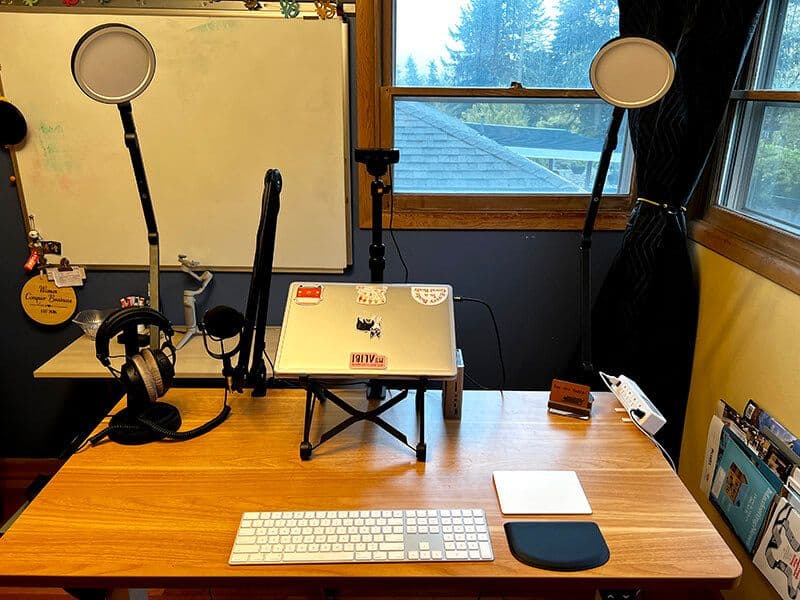
If you’re curious about the space-saving desk setup I’m currently using, I’ve included it below.
Why? Because I suspect many of you don’t have my patience — nay, stubbornness, curiosity, and budget — to try numerous configurations for three years. I know, I know…
Here’s what I’m working with:
- Room size: 8′ x 10′
- Desk size: 48″ x 24″
- Computer: 16″ MacBook Pro, laptop stand, Trackpad, Keyboard with Numeric Keypad
- Misc: Podcast mic, webcam, lighting for video calls and streaming
I wanted space to work at my desk WITHOUT giving up access to my whiteboard, closet, or office windows.
Here’s how I did it:
- Desk: FLEXISPOT EG1 Electric Sit Stand Desk 48″ x 24″*
- Headphones: Beyerdynamic DT 770 PRO 250 Ohm*
- Headphone Stand: Avantree Metal & Silicone Headphone Stand*
- Laptop Stand: Nexstand Laptop Stand
- Webcam: Logitech C922x Pro Stream Webcam*
- Webcam/DSLR Camera Stand: JUSMO Camera Desk Mount Stand with 360° Ballhead*
- Mic: Shure MV7*
- Mic Stand: Suspension Boom Scissor Arm Stand for Shure SM7B*
- Lighting: Lume Cube Edge LED Desk Light (Pack of 2)*
- Removable Desktop Power Center: 3 AC Outlet Desk Clamp Power Strip*